The Ultimate Guide to GoHighLevel Funnel Building (2026)
In 2026, a website is just a digital brochure, but a funnel is a salesperson that never sleeps. If you want to scale your agency or your clients’ businesses, you must master the art of the GoHighLevel funnel.
Many people think funnel building is just about dragging and dropping elements on a screen. That is a mistake. Professional funnel building is about psychology, data flow, and conversion-focused logic. This guide will show you how to build funnels that actually convert visitors into paying customers.
The Strategy: Funnels vs. Websites
Before we open the editor, we must understand the difference between a funnel and a website. A website gives people too many choices. They click “About Us,” then “Blog,” and then they leave.
A funnel has one goal. Whether it is a lead magnet download or a high-ticket sale, every page in a funnel pushes the user toward a single action.
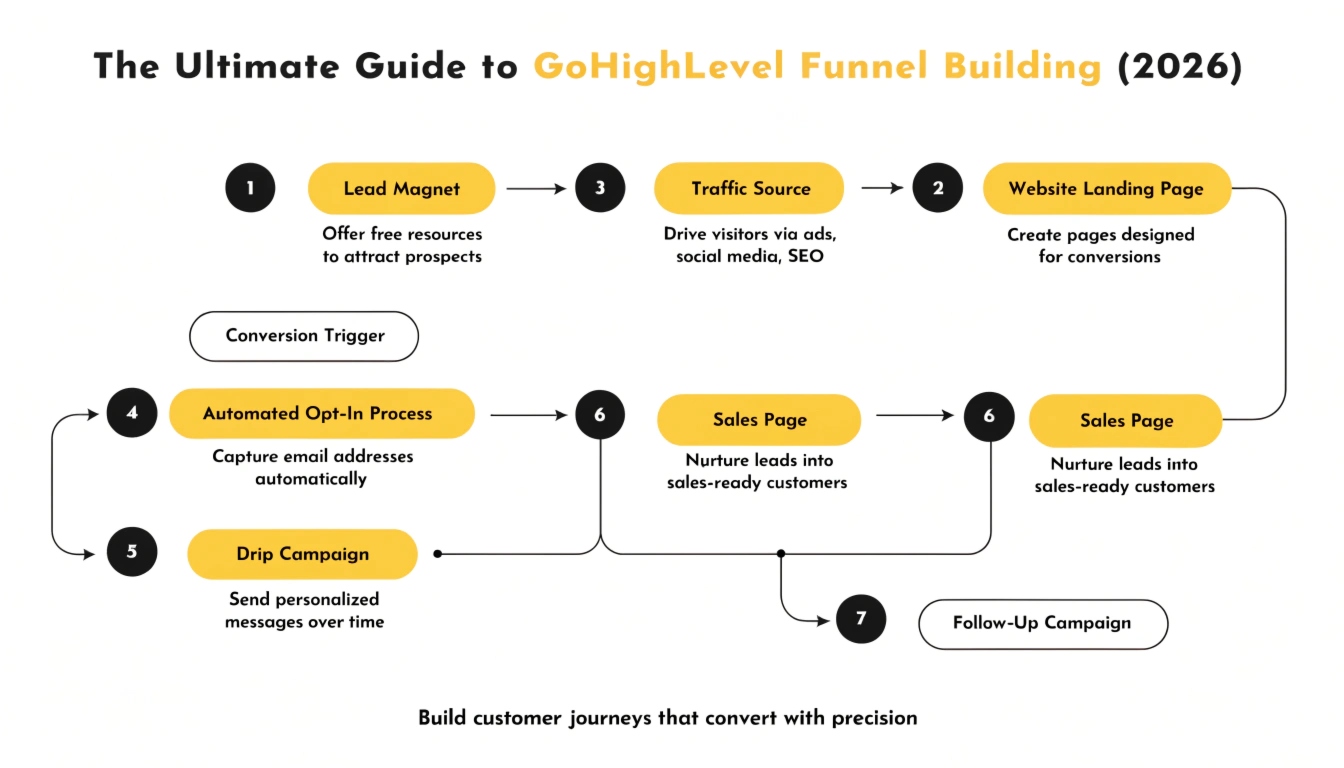
The Anatomy of a Winning Funnel
Setting Up Your Funnel Foundation
You cannot build a skyscraper on sand. In GoHighLevel, your foundation consists of your domain settings and SEO metadata.
Mapping Your Domain
Never use a messy URL like [app.gohighlevel.com/v2/preview/12345](https://app.gohighlevel.com/v2/preview/12345). You must map a custom domain or subdomain (e.g., offer.yourbrand.com). This builds trust with the user and improves your ad performance on platforms like Facebook and Google.
SEO Metadata & Social Sharing
Every page in your funnel needs a unique SEO title and description. When you share your funnel link on social media, the “Social Image” is what people see. If you leave this blank, your link will look like spam.
Designing for the “Mobile-First” Era
As of 2026, over 80% of your funnel traffic will likely come from mobile devices. If your funnel looks great on a desktop but is broken on a phone, you are throwing money away.
Use the Mobile-Only Toggle
GoHighLevel allows you to create sections that only appear on mobile or only on desktop.
Speed is Everything
Heavy images kill conversions. Always use WebP format for your images and keep them under 150KB. If a page takes more than 3 seconds to load, half of your visitors will leave before they see your offer.
Advanced Funnel Features: Upsells and Order Bumps
The secret to a high Average Order Value (AOV) is the “One-Click Upsell”. GoHighLevel makes this easy to set up.
The Order Bump
This is a small checkbox on the checkout page. It offers a complementary product (e.g., “Add the Workbook for $9”). It is an easy way to increase your revenue without extra marketing costs.
One-Click Upsells (OCUs)
After the user buys the main product, they see a special “Thank You” page. Instead of just saying thanks, you offer them a premium upgrade. They can add it to their order with one click—no need to re-enter their credit card details.
Integrating Logic with Your Funnel
A funnel is not an island. It must talk to your CRM and your workflows.
Using Tracking Pixels
You must install your Facebook Pixel and Google Tag Manager. This allows you to “retarget” people who visited your funnel but didn’t buy. You can show them an ad that says, “Hey, you forgot something!”
Form and Survey Triggers
When someone fills out a form in your funnel, it should trigger a GoHighLevel workflow. This is where you send the confirmation email, tag the contact, and notify your sales team.
The Power of Surveys in Funnels
Surveys are better than forms because they allow you to segment your leads. Instead of just asking for an email, ask a qualifying question: “What is your monthly revenue?”
This ensures you are spending your time on the most valuable leads.
A/B Testing: Let the Data Decide
In 2026, we don’t guess what works; we test it. GoHighLevel has a built-in “Split Test” feature.
You can create two versions of your landing page (Version A and Version B).
GHL will send 50% of the traffic to each. After a week, you look at the stats. If Version B has a 10% higher conversion rate, you make it the permanent page. This is how you “optimize” a funnel over time.
High-Ticket Appointment Funnels
If you are an agency owner, you likely need an appointment funnel. This is a 3-step process:
Pro Tip: Use the “Sticky Contact” feature. If they filled out their name on step 1, they won’t have to type it again on the calendar page.
Membership Sites and Course Funnels
GoHighLevel isn’t just for lead gen; it is a full membership platform. You can build funnels that sell access to a digital course. Once the payment is successful, the workflow logic automatically creates their member account and emails them their login link. This is a completely “hands-off” business model.
Frequently Asked Questions
Can I import funnels from ClickFunnels?
Yes. GoHighLevel has a 1-click importer. You simply paste your ClickFunnels URL, and GHL recreates the page structure for you.
Do I need a separate hosting plan?
No. GHL hosts all your funnels and images on their secure, fast servers.
What is a “Global Section”?
A global section (like a header or footer) stays the same across all pages. If you change the logo in a global header, it updates on every page in your funnel instantly.