GoHighLevel Workflow Automation: The Agency Playbook (2026)
In 2026, the single biggest differentiator between a struggling business and a multi-million-dollar operation is operational efficiency. Most organizations do not fail because they lack leads. They fail because their human teams cannot scale to handle those leads fast enough.
Manual follow-up is slow, inconsistent, and expensive. When a lead falls through the cracks, it takes your hard-earned marketing capital down with it. GoHighLevel workflow automation eliminates this human error by building a flawless, trigger-based execution layer across your entire business. This 3,000-word blueprint provides the exact framework required to design, deploy, and scale enterprise-grade automation within the GoHighLevel environment.
What is GoHighLevel Workflow Automation?
GoHighLevel workflow automation is the process of creating automated, logic-driven sequences that execute business operations when specific triggers occur. These actions span multiple channels—including SMS, email, internal phone calls, pipeline shifts, and third-party API webhooks. A properly configured workflow runs 24/7/365, turning cold lead submissions into highly qualified sales conversations without requiring a human operator to touch the keyboard.
Read this: The Complete Guide to GoHighLevel CRM Setup (2026)
Deconstructing the Workflow Engine Architecture
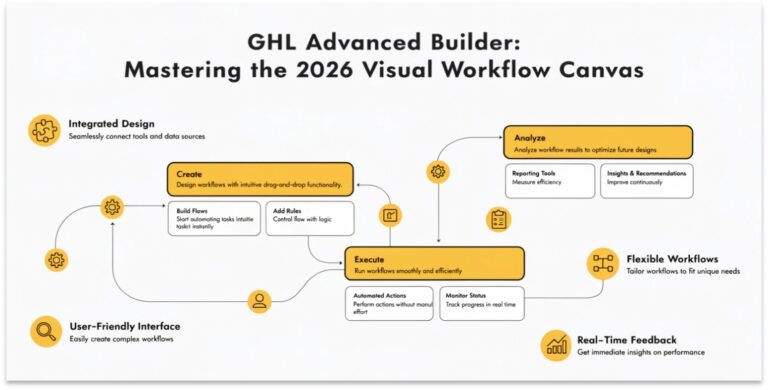
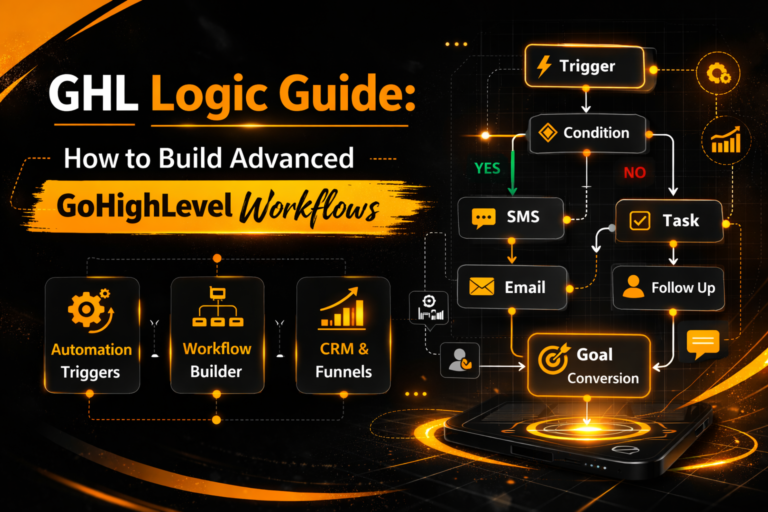
To build advanced automations, you must understand the underlying structure of the GoHighLevel workflow builder. Think of a workflow as a classic “If/Then” engineering model. Every workflow consists of two fundamental components: Triggers and Actions.
Triggers are the operational catalysts. They tell the system exactly when to start listening. Examples of triggers include a contact filling out a web form, an inbound call going missed, or a tag being manually added to a lead profile.
Actions are the operational execution steps. Once a trigger fires, the system executes a sequential list of steps. This can include sending an introductory email, adding a delay timer, or assigning the contact to a specific sales representative via a round-robin system.
To build your first automated sequence, navigate to Automation > Workflows in your sub-account dashboard. Click Create New Workflow and select Start from Scratch to ensure you control every piece of system logic.
Advanced Trigger Mapping and Filters
A common mistake in workflow design is firing automations too broadly. If you set a generic trigger like “Form Submitted,” the workflow will execute every single time any form on your website is completed. This creates chaos in your database.
To prevent this, you must master the use of Workflow Filters. Filters let you drill down into the exact context of the event.
For example, when using the Form Submitted trigger, always click Add Filters. Select Form Is and choose your specific asset, such as “High-Ticket Strategy Form 2026.”
Diversifying Your Operational Catalysts
GoHighLevel provides a massive library of advanced triggers that go far beyond standard form fills. You can build automation sequences based on deep user actions:
Mastering Technical Conditional Logic: If/Else Branching
The absolute heart of advanced automation is the If/Else workflow action. This action allows your system to make real-time decisions based on contact data, tags, or behavioral attributes.
In our practical experience building complex automation networks, we have found that proper If/Else design is what separates a generic autoresponder from an intelligent CRM system. However, you must keep in mind that the If/Else action has a strict 50-condition branch limit that can break configurations if your structural logic is over-engineered.
Building a Qualification Branch
Imagine you run a campaign where leads select their monthly budget via a dropdown field. Right after the form trigger, add an If/Else action block.
Configure Branch A to look for “Contact Details > Custom Fields > Monthly Budget Is $5,000+.” Configure Branch B as the default “Unqualified” path.
The system will instantly split the traffic. High-value leads on Branch A get an immediate phone call from your top sales rep. Low-value leads on Branch B receive a automated, soft email drip redirecting them to a self-service resource library.
The Timing Layer: Wait States and Goal Actions
Automation should never feel robotic to the end consumer. If an email blast flies into a prospect’s inbox precisely 0.5 seconds after they text you, they instantly know they are interacting with a machine. You must use time buffers to create a natural, human flow.
Utilizing the Wait Action
The Wait action pauses the workflow execution for a set duration. You can configure delays based on minutes, hours, or days.
Even better, you can use Advanced Time Windows. You can configure a wait state to release a contact only between 9:00 AM and 5:00 PM on weekdays. This prevents your workflow from text-blasting a new client on a Sunday evening.
Enforcing Goal Actions to Prevent Spam
There is nothing worse than sending an automated email that says “Hey, are you free to chat?” to a client who already booked a call an hour ago. It shows your systems are disconnected.
To solve this, place a Goal Action inside your follow-up sequence. Configure the Goal to look for “Trigger: Appointment Booked.”
If a contact schedules a meeting while sitting midway through a 7-day follow-up drip, the Goal action will instantly pull them out of the remaining sequence. This keeps your communications highly relevant and prevents your brand from looking spammy.
Enterprise Multi-Channel Execution: SMS, Email, and WhatsApp
A true agency playbook relies on omni-channel omnipresent messaging. If you only follow up via email, you are missing 80% of your audience. GHL allows you to stack communication formats inside a single execution thread.
Read this: The Ultimate Guide: GoHighLevel for Marketing Agencies (2026)
Crafting the First 60-Second Touch
When an inbound inquiry hits your database, your workflow should initiate a multi-channel sprint.
- Step 1: Send an optimized email containing deep case studies and authoritative resources.
- Step 2: Add a 2-minute Wait state.
- Step 3: Deliver a personalized, plain-text SMS directly to their phone: “Hi, I just reviewed your project request. Do you prefer chatting via text or a quick phone call?”
By breaking up the communication formats and inserting slight timing delays, your automated sequences feel exactly like a human assistant manually typing out messages in real time.
Internal Agency Routing: Whisper Calls and Push Notifications
Automations aren’t just for external prospects. They are vital for managing your internal operations and driving team accountability.
Deploying the “Whisper” Action
When a premium, high-ticket lead fills out an operational form, your system must force your sales team to act. Insert a Whisper action into your qualified branch.
GHL will instantly dial your sales representative’s mobile phone. When the rep answers, they will hear an automated system voice say:
If the rep presses 1, GHL dials the prospect immediately. This drops your “Speed-to-Lead” metric down to under 30 seconds, heavily increasing your conversion percentages.
App Push and Internal Task Management
Simultaneously, use the Internal Notification action to drop a native push alert to your team’s GoHighLevel mobile app. Pair this with an automated Create Task action to assign a hard deadline to the account manager, ensuring absolute operational accountability.
The Power of Premium Actions and External Webhooks
As of GoHighLevel’s recent architectural upgrades, the workflow builder includes Premium Actions. These allow you to execute advanced calculations and external database checks without requiring third-party tools like Zapier.
Leveraging Slack and Google Sheets Directly
You can use native Premium actions to send formatted data directly into your agency’s operational Slack channels or sync financial numbers to corporate Google Sheets instantly. This eliminates external subscription costs and reduces systemic connection points that can fail.
Triggering Custom Webhooks
If you need to pass data into a proprietary backend system or a custom software product, use the Webhook action block. Simply input your target endpoint URL and select your data payload. GHL will securely post the complete contact record and system history downstream in real time.
Common Automation Mistakes That Damage Brand Reputation
Building automation requires technical discipline. A poorly constructed loop can destroy your delivery domain reputation and cause mass client cancellations in a matter of minutes.
The Endless Loop Trap
An endless loop happens when an action inside a workflow accidentally triggers the exact same workflow from the top. For example, if your workflow trigger is “Contact Tag Added: Lead-In” and your final action step is “Add Tag: Lead-In,” the system will loop infinitely, blasting the client with hundreds of identical messages until your Twilio balance hits zero.
Ignoring A2P 10DLC Guidelines
Never use overly promotional language, capitalization spam, or sketchy link shorteners (like bit.ly) in your automated SMS blocks. Modern telecom networks utilize heavy AI filtering. If your automated text workflows trigger high carrier filtering rates, your entire sub-account phone configuration will be permanently blacklisted.
Frequently Asked Questions (FAQ)
What is the difference between a workflow trigger and a workflow action?
A trigger is the specific event or condition that tells the GoHighLevel system to start running an automation. An action is the actual task or sequence of tasks (like sending an email or moving an opportunity card) that the system executes once the trigger fires.
How do I automatically stop a workflow when a lead replies?
Navigate to your specific workflow’s settings panel and toggle on the “Stop on Response” feature. When this is enabled, the system will instantly freeze the sequence for an individual contact the moment they reply via text, email, or social messenger.
Can I use GoHighLevel workflows to send data to external software without Zapier?
Yes. You can use native Premium Actions to connect directly with platforms like Slack and Google Sheets, or use the standard Webhook action block to securely send structured JSON data payloads to any external software API endpoint.
What happens if multiple triggers are added to a single GoHighLevel workflow?
If you configure multiple triggers at the top of a single workflow, the sequence operates on an “OR” logical connection. The automation will execute for a contact if any single one of those specified triggers occurs in your sub-account environment.
How do I test my GoHighLevel workflow before pushing it live to public traffic?
Click the Test Workflow button located in the top right corner of the builder screen. Select a dummy test contact from your database to push through the sequence. You can then review the execution logs in the Execution History tab to verify every step worked perfectly.
10. Final Summary: Your Agency Engine
Workflow automation is the ultimate leverage point for any modern business. By building clean, trigger-based environments, you free your human team from administrative data entry and ensure your leads receive world-class follow-up every single time. Map out your business rules clearly, build your logic paths carefully, and let GoHighLevel run your daily business operations on complete autopilot.
Ready to Automate Your Business Operations?
Stop fighting with broken triggers and manual follow-up scripts. If you want our certified automation engineers to design a flawless Master Snapshot, construct advanced If/Else conditional routing, or build custom webhook integrations for your business, let’s get started.