GHL Sentiment Analysis: How to Automate Based on Lead Emotion
Have you ever had an angry lead reply to an automated text, and your system just kept sending “happy” sales messages? It looks bad. In 2026, you can stop this. With GHL Sentiment Analysis, your logic can now detect if a lead is happy, sad, or frustrated.
This guide will show you how to use AI Intent Detection to make your GoHighLevel (GHL) workflows more “human.”
What is AI Sentiment Analysis in GHL?
Sentiment analysis is a tool that “reads” the tone of a message. It doesn’t just look at keywords. It looks at the feeling behind the words.
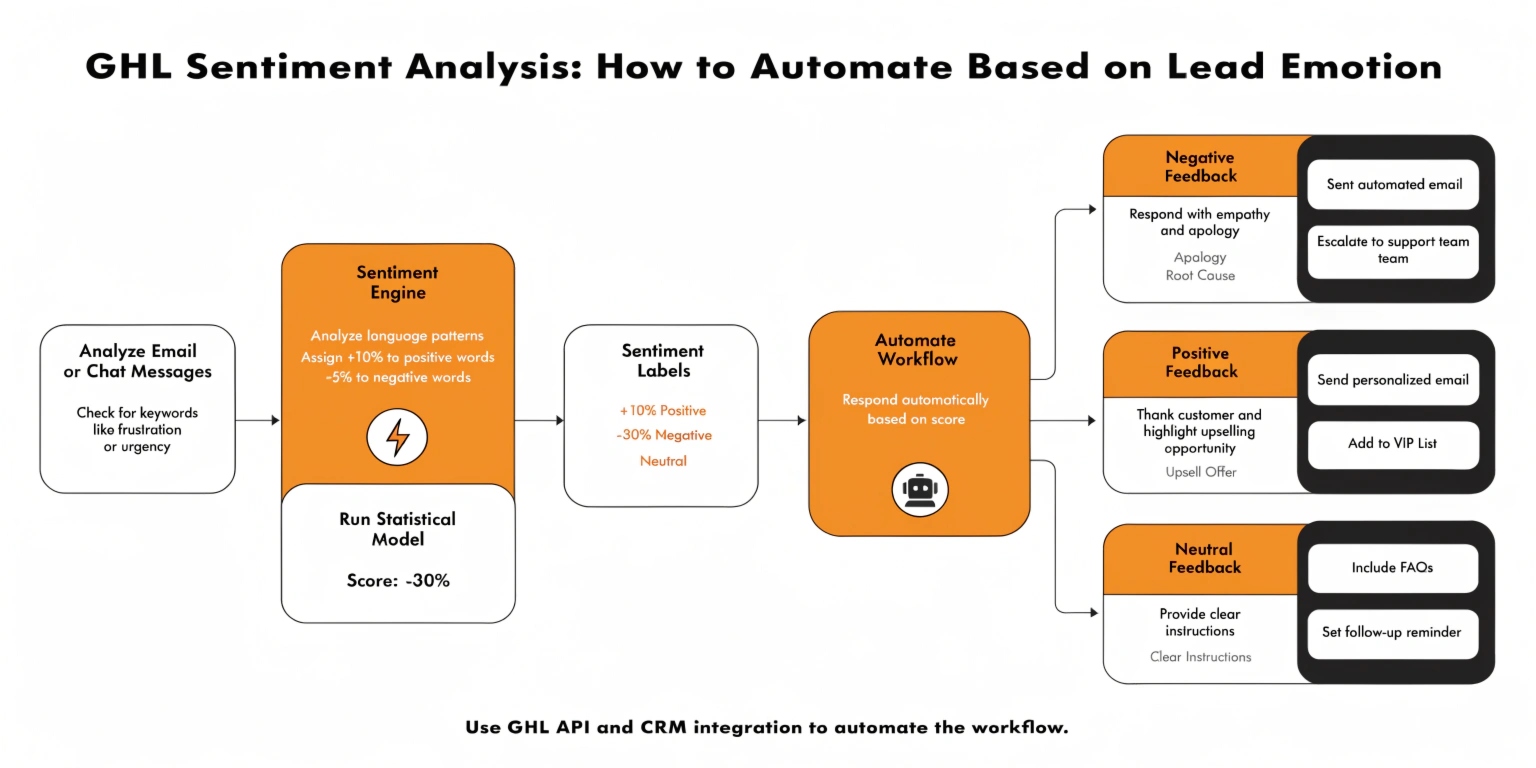
In GHL, the system breaks every reply into three simple categories:
Why Emotion-Based Logic is the Future
In the old days of SEO and marketing, we used “Keyword Triggers.” If a lead said “Stop,” we opted them out. But what if they said, “Please stop sending these, I’m having a bad day”? A robot might miss the “bad day” part.
With Sentiment Logic, you can:
Read this: GHL Agent Studio: How to Build Your First AI Employee
How to Set Up the “AI Intent Detection” Action
This is a new action in the 2026 GHL Workflow builder. Here is how to use it.
The Trigger
Start with a “Customer Replied” trigger. You want the AI to analyze the incoming message immediately.
Add the AI Intent Detection Node
Click the + button and search for “AI Intent Detection.” * Input Text: Select {{message.body}}. This tells the AI to read the actual text the lead sent.
Create Your Three Branches
Once you add the node, GHL will automatically give you three paths. You must decide what happens in each one.
| Branch | Action Example | Why it works |
| Positive | Send Booking Link | Strikes while the iron is hot. |
| Negative | Alert Admin + SMS Apology | Stops the “bot” feel and starts a “human” save. |
| None | Ask a Follow-up Question | Keeps the conversation moving forward. |
Advanced Move: Sentiment for Voice AI
Did you know GHL can now analyze the sentiment of a phone call? In 2026, when your AI Voice Agent finishes a call, it creates a “Call Summary.”
You can set your logic to look at that summary. If the summary says “Negative Sentiment,” your workflow can automatically send a “Sorry we couldn’t help” email with a 20% discount code. This is how you turn a bad call into a future sale.
Common 2026 Use Cases
The “Auto-Review” Machine
Don’t ask every customer for a Google review. Some might be unhappy! Use logic to check their last 3 messages. If the sentiment is Positive, trigger the review request. If it’s Negative, trigger a “How can we improve?” survey instead.
The “Angry Lead” Emergency Brake
If the AI detects Negative sentiment in a reply, the first action should be “Remove from all Workflows.” This ensures they don’t get any more automated sales pitches while they are already upset.
Frequently Asked Questions (FAQs)
Is Sentiment Analysis 100% accurate?
It is very close! In 2026, AI understands sarcasm and slang much better than before. However, always have a “Human Handoff” option just in case.
Does this work in different languages?
Yes. GHL’s AI can detect intent in over 100 languages. Whether your lead replies in Spanish, French, or English, the logic stays the same.
How much does it cost?
Sentiment analysis usually uses “AI Credits” (Rebilling). It is very cheap—often just a few cents per message to protect your brand’s reputation.
Read this: GHL AI Decision Maker: The New Way to Build Smart Workflows
Final Thoughts: The Empathetic Agency
The best agencies in 2026 don’t just use the most tools; they use the most empathy. By using GHL Sentiment Analysis, you prove to your leads that you are listening.
Ready to try it? Go to your most active workflow and add an AI Intent node after the first reply. You will see the difference in your conversion rates almost immediately.