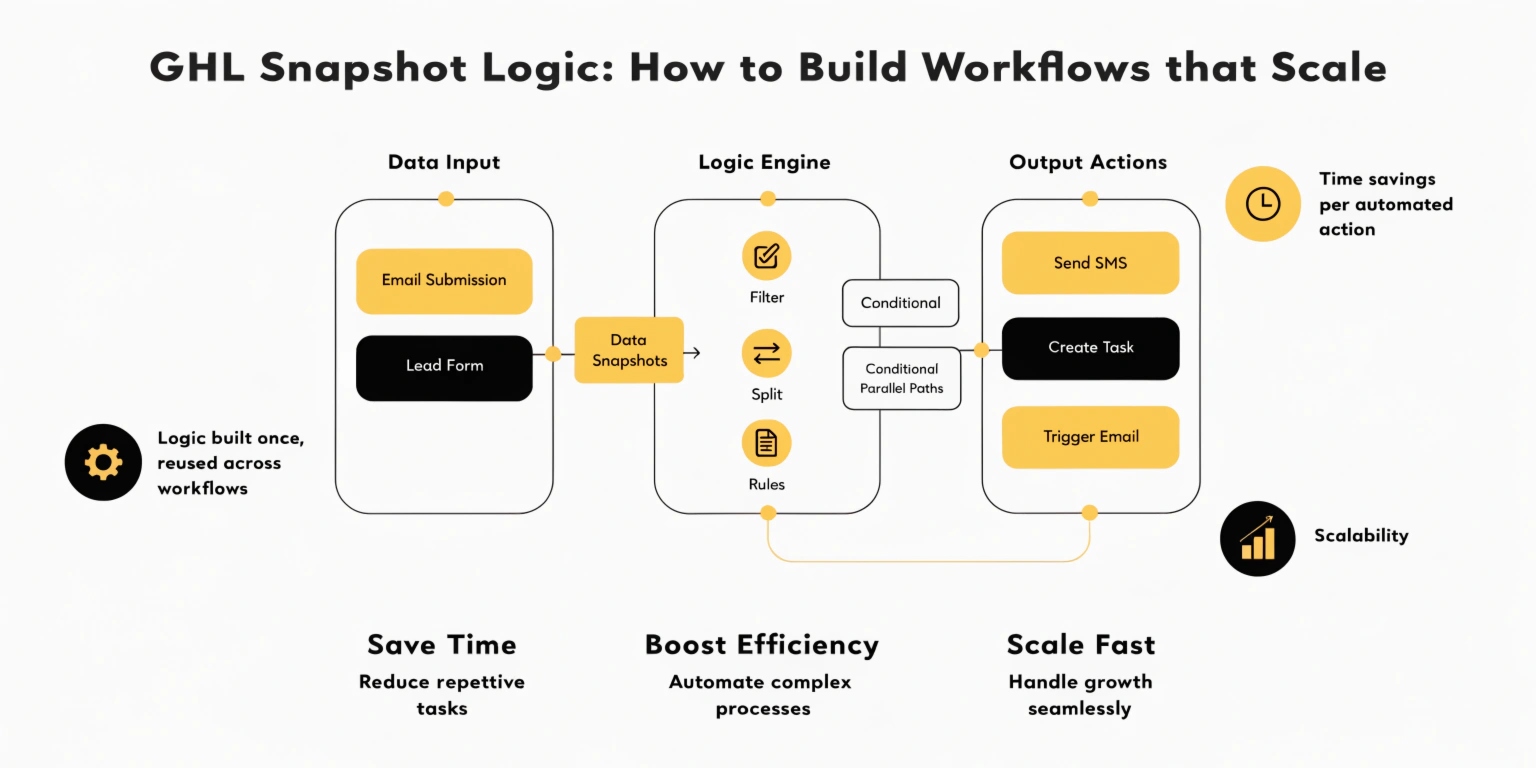
GHL Snapshot Logic: How to Build Workflows that Scale
Building one smart workflow is easy. Building workflows for 100 different clients is hard. If you don’t have a plan, your GoHighLevel (GHL) agency will become a mess of broken links and confused leads.
In 2026, the best agencies use Logic Architecture. This means building “Snapshots” that are easy to install, easy to fix, and impossible for clients to break.
What is Snapshot Logic?
A Snapshot is a template of your entire GHL setup. “Snapshot Logic” is the way you organize that template so it works for every new client instantly.
Instead of building new workflows for every customer, you build one Master System and use logic to customize it.
Read this: GHL Sentiment Analysis: How to Automate Based on Lead Emotion
The Three Pillars of Scalable Logic
Using Custom Values as “Logic Switches”
In 2026, you should never type a phone number or a price directly into a workflow. Why? Because if the price changes, you have to find every workflow and fix it.
Instead, use Custom Values.
Organizing with Workflow Folders
As your agency grows, you will have hundreds of workflows. Without folders, you will get lost.
Pro-Tip: Use a Numbering System
How to Build a “Protected” Snapshot
Clients love to click things they shouldn’t. Here is how to use logic to “client-proof” your setup.
Use “Internal Notification” Nodes
Don’t just send a text to the lead. Use logic to send an internal notification to the client. This shows them the system is working.
The “Safety Net” Branch
In every workflow, add an “Else” branch that alerts you (the agency owner) if a lead gets stuck. This allows you to fix problems before the client even notices.
Lockdown Logic
In 2026, you can use Permission Logic. You can hide complex workflows from your clients so they only see the simple “Settings” page you want them to use.
Comparing Manual Setup vs. Snapshot Logic
| Task | Manual (One-by-One) | Snapshot Logic |
| Onboarding a Client | 5-10 Hours | 10 Minutes |
| Updating a Feature | Must edit every account | Update Master Snapshot & Push |
| Fixing Errors | Hard to find | Centralized & Easy |
| Scalability | Low (Limits your growth) | Unlimited |
The 2026 Update: Agency-Level Global Logic
A new feature in 2026 is Global Logic. You can now create a workflow at the Agency Level that applies to all sub-accounts.
For example, you can create a “Holiday Logic” that automatically adds “Happy New Year” messages to every client’s account with one click. This is the ultimate power move for scaling agencies.
Frequently Asked Questions (FAQs)
What is the best way to name my workflows?
Use a naming convention: [Category] - [Trigger] -> [Goal].
Example: [Sales] - Form Submitted -> Book Call.
Can I protect my logic from being stolen?
Yes. You can use Snapshot Protection settings to ensure that if a client leaves your agency, they cannot take your complex logic with them.
Do I need a special plan for Snapshots?
Snapshots are available on most plans, but the SaaS Mode plan gives you the best tools for automating the “Push” of logic updates to all clients at once.
Read this: GHL Agent Studio: How to Build Your First AI Employee
Final Thoughts: Build for the Future
Don’t build for today. Build for 1,000 clients. By using Snapshot Logic, you aren’t just a “GHL guy”—you are a software provider with a scalable product.